 Cedmenu
DIY software or a managed menu-board service?
Compare design, software, player setup and ongoing responsibilities before choosing an approach for your restaurant.
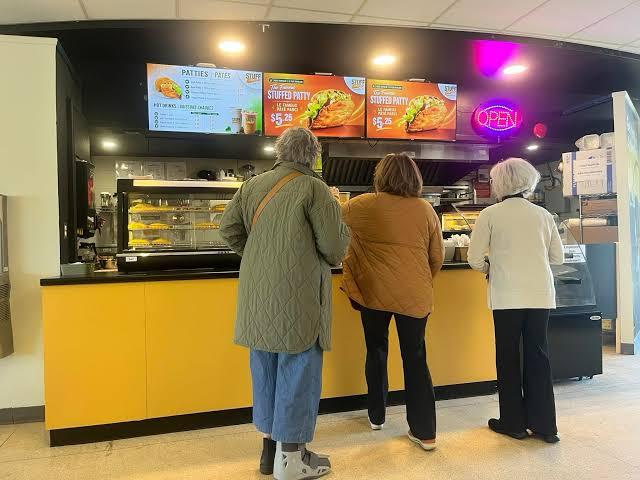
Stuff It Up, from CedMenu’s project portfolio. Compare the design and the work behind the screens.
DIY digital signage software can suit a restaurant with someone ready to design menus, configure playback and maintain the screens. A managed menu-board service can suit a team that wants help with the design and agreed setup. The useful comparison is who will do each job before launch and during a busy service.
Decide who will own the work
DIY describes a way of working, not a fixed feature set. Some software providers offer templates, compatible players or paid design help. Managed services also vary. Check the actual proposal instead of assuming everything is included in either category.
CedMenu offers custom menu design, software, player boxes and box setup. Confirm revisions, available editing features and ongoing design or technical support in your quote. TV mounting, electrical work and building wiring must be arranged separately.
| Responsibility | DIY software approach | CedMenu managed approach |
|---|---|---|
| Menu design | Your team prepares artwork or arranges design help; check template and export options. | Custom design is scoped around your menu, brand and screen arrangement. Confirm revisions and deliverables. |
| Screen and player setup | Your team confirms supported equipment and configures playback, or buys setup help. | CedMenu supplies and sets up player boxes. Confirm TV compatibility, connections and site readiness. |
| Changes after launch | Assign staff to edit, review, publish and check the display. | Agree who requests, approves and publishes changes, and which editing tools and services are included. |
| Support | Check software support and who handles artwork, equipment and local network issues. | Confirm technical support separately from future design work, including channels, hours and charges. |
Try one realistic menu change
Ask each provider to demonstrate the same task: change one item price, review the full board and confirm it appears on the intended screen. Identify who can publish, how you correct an error and who checks that the board matches the price charged at the counter.
If you need breakfast and lunch menus, test the transition at the restaurant’s local time. Ask what remains on screen during a connection outage and what requires reconnection. Do not assume a smart TV, streaming stick or offline feature will work with every system. Use the screen and player guide to prepare model numbers and connection details.
For POS-linked prices, ask about your exact system, location, items and supported fields. Have the provider demonstrate that workflow before treating it as part of the plan. CedMenu’s menu-update guide explains its reviewed update process and current integration scope.
Compare the complete cost and handover
Give each provider the same screen count, menu, artwork requirements and location details. Compare one-time design, equipment and setup costs alongside recurring software and service charges. Include the staff time needed to create layouts, train colleagues and keep menus current.
Ask about billing periods, minimum terms, renewals, cancellation, artwork ownership and access, and charges for additional layouts, screens or changes. Confirm who controls the software account and how artwork and screen access are handed over if you change providers. A subscription total alone does not tell you how much work remains for your restaurant. Use the quote checklist to compare the inclusions in writing.
Inspect work that resembles your restaurant
Look for menus with a similar number of categories, offers and screens. Check whether names, prices and combo contents are readable from the ordering position. Ask which parts of the example the provider actually delivered.
CedMenu’s Stuff It Up project includes a counter photo and supplied menu artwork. The café’s own published story describes its menu-board project in Kingston. Use that example to discuss layout and setup; its reported business results are qualified observations, not a forecast for another restaurant.
For an Ontario project, the service planning page explains CedMenu’s scope and the equipment and location details to bring. Confirm your specific requirements before buying screens or arranging site work.
Choose the approach your team can maintain
DIY can be a practical choice when someone has the time and skills to own design, equipment checks and routine updates. Agree on a backup person so that a staff change does not leave the menu unattended.
A managed approach can help when your team wants custom design and agreed setup support. Make the handover specific: approved boards, screen assignments, update permissions, training and a contact for problems. You may also combine software with separately commissioned design; confirm responsibility where the services meet.
Choose using a working demonstration, relevant examples and a written scope. Bring the same requirements to every conversation so the comparison is useful. Get a custom quote →