 Cedmenu
The AI behind your menu, explained
Create a menu board with AI, request voice updates, connect your POS and use sales insights to decide what to feature.
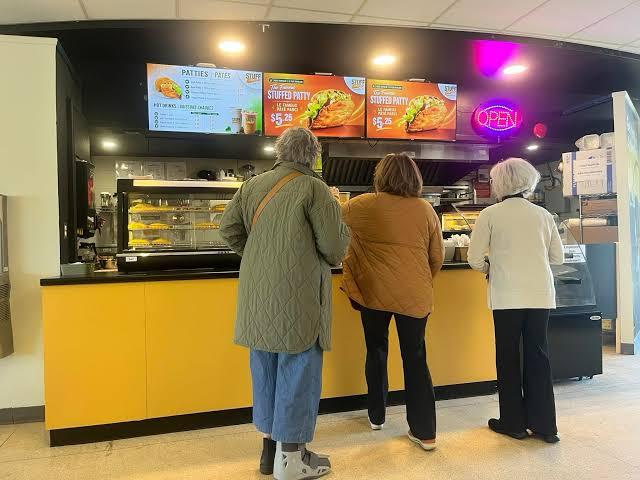
Stuff It Up, from CedMenu’s restaurant portfolio. The boards put menu choices at the ordering counter.
CedMenu connects the decisions behind a menu with the design customers see. Sales context helps identify an opportunity. AI-assisted planning and design turn that opportunity into a board proposal. Voice requests and review controls help keep changes accurate. Here is how those parts fit together, and where your team stays in control.
CedMenu Intelligence: use sales insights to choose what to feature
A useful menu decision starts with what customers actually order. CedMenu can use supported POS information, including transaction frequency and time-of-day patterns, to help identify items and service periods worth a closer look. At Stuff It Up, those patterns inform controlled AI menu updates and promotions.
The connection is only useful when the data is mapped correctly. The restaurant, location, item and size or variant need to match the menu being displayed. If there is too little reliable information, the next step is to collect or clarify it, not present an unsupported recommendation as a fact.
- Sales context: which items are ordered and when.
- Menu context: the correct names, variants, prices and service period.
- Business context: the offer you want to promote and the outcome you want to measure.
Merchandising turns a pattern into a choice
The next question is not simply what looks attractive. It is what deserves attention while a customer is deciding. A focused promotion can make a meal easier to understand, show a relevant add-on beside a main, or give an overlooked item a clearer position.
Consider an illustrative lunch promotion. The team identifies a relevant add-on, checks that the kitchen can supply it, confirms its price, and decides how it fits the main meal. CedMenu’s AI-assisted planning and promotion tools help turn that direction into a board proposal. The example explains the workflow; it is not a report of a particular restaurant’s results.
Sales and margin are different inputs. Evaluating contribution margin also requires reliable item costs. A sales connection should not be assumed to provide stock availability, food costs or every field needed for a profitability decision.
Create your menu board with AI
Once the offer is clear, it needs a clear place on screen. CedMenu’s workflow connects menu information and source assets with board planning, AI-assisted generation and quality review. The result should make the selected item easier to notice without making the rest of the menu harder to use.
A useful design brings the item name, representative food imagery, price and inclusions together. It can give a featured choice more space, reorganize the visual hierarchy and keep related details readable. Missing source assets need to be resolved before the work is ready; a generated draft is not the same as an approved restaurant screen.
Review the proposal for your brand, menu accuracy and actual viewing distance. The AI workflow currently includes CedMenu-managed steps, so the tools and responsibilities available to a restaurant team are confirmed for its setup.
- Content check: correct item, variant, price and combo inclusions.
- Design check: readable text, realistic imagery and clear emphasis.
- Screen check: the right format, location and display before publication.
Voice directs changes without skipping review
Voice is one way to control the wider system. With the appropriate permissions, a user can request menu changes in plain language. The system needs enough detail to resolve the exact item and intended change, rather than guessing between similar names or sizes.
For a price update, specify the business, target board, item or variant and new amount. Multiple price changes can be collected into a change session. Check the read-back, clarify anything ambiguous, and confirm the complete request.
Confirmation prepares a pending board version. An authorized CedMenu operator reviews, approves and publishes it, then checks the display. This separation gives the team a chance to catch an incorrect amount or an unintended design change before customers see it.
- Request: identify the item and the change.
- Clarify: resolve the location, variant and amount.
- Preview: check the pending board and its menu information.
- Approve and publish: the authorized operator releases the reviewed version.
Permissions, syncing and schedules have different jobs
Not every account has the same controls. AI promotion generation, AI scheduling and board approval are currently restricted to CedMenu’s superadmin workflow. Restaurant-admin promotion generation is planned, not a generally available self-service feature. Agree on who requests changes and who handles the managed steps before launch.
A direct edit, a POS price sync and a screen schedule are separate operations. CedMenu currently supports automatic Square price updates to live boards; other POS integrations are in progress. Confirm the supported fields, item mapping and source of truth for your account.
A schedule determines when approved content appears. It needs a target screen, time zone, days or dates, a start and end time, and a board to return to afterward. A spoken edit should not be treated as confirmation that a schedule has also been saved. Test the next screen transition after setup.
Offline playback depends on the player and configuration. Where caching is supported and enabled, previously synced content may remain available. New updates and POS sync require a connection.
Measure the outcome, then inform the next decision
Choose the measure before changing the promotion. Item units sold show demand for a particular product. Add-on attachment shows how often an extra is included. Average order value measures sales per completed order. Contribution margin also accounts for relevant costs. These are related, but they are not interchangeable.
Compare similar service periods and keep track of price changes, availability, customer traffic and other promotions. A higher sales figure alone does not establish that the board caused the increase. The Stuff It Up case study gives reported project results and their limitations, not a guaranteed outcome for another restaurant.
The goal is a better-informed next decision: understand what changed, review the evidence and refine the menu. The workflow described here is not a claim that every board autonomously redesigns itself or learns in real time without review.
What to confirm for your restaurant
Start with your menu, screen arrangement and current POS. CedMenu can scope the design, supported connections and ongoing workflow around that setup. These questions make the handover practical:
- Which POS data and price fields are supported?
- Which editing tools are enabled for our account?
- Who requests, reviews and publishes each type of change?
- Which promotions follow a schedule, and what happens offline?
- Which result will we measure, and what baseline will we use?
See what this could look like for your menu. We’ll confirm the available features, responsibilities and setup in your quote. Get a custom quote →